
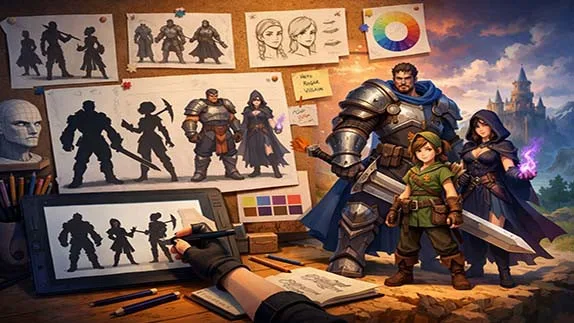
A beginner-friendly guide to game character design, covering core principles, step-by-step workflow, visual clarity, color theory, and gameplay-focused character creation
Character Design for Games: A Beginner’s Guide to Creating Memorable Game Characters
- 👨🏫 Author: mohammad saleh salmanzadeh
- 🌐 Language: Persian / English
- 📝 Creation Date:
- 📅 Last Updated Date:
- 📂 Category: Game Content Creation
- 🔗 Sharing:

Character Design for Games: A Beginner’s Guide to Creating Memorable Game Characters
Character design is one of the most important parts of game development. Players may forget levels or mechanics, but they rarely forget a strong character. From iconic heroes to terrifying villains, characters are the emotional bridge between the player and the game world.
This article is written as a step-by-step educational guide for beginners who want to learn game character design from scratch. No art degree or technical background is required—only curiosity and willingness to practice.
What Is Character Design in Games?
Character design is the process of creating a visual and conceptual identity for a character in a game. This includes:
Appearance (shape, color, clothing)
Personality and behavior
Role in the story or gameplay
Emotional impact on the player
In games, character design is not only about looking good. A well-designed character communicates information instantly:
Who they are, what they do, and how the player should feel about them.
Why Character Design Matters in Games
Before learning how to design characters, you need to understand why it matters.
1. Characters Drive Player Engagement
Players connect emotionally with characters. A strong design builds attachment and immersion.
2. Characters Support Gameplay
In games, design must serve function. A tank character should look heavy. A fast character should look agile.
3. Characters Build Brand Identity
Many successful games are remembered mainly because of their characters.
Core Principles of Game Character Design
These principles apply to all game genres and art styles.
Simplicity Comes First
Beginners often overdesign. This is a mistake.
Good character design is clear, not complex.
Ask yourself:
Can the character be recognized in silhouette?
Can the player understand their role at a glance?
If the answer is no, the design is weak.
Shape Language Basics
Shapes communicate personality subconsciously.
Circles → Friendly, cute, safe
Squares → Strong, stable, reliable
Triangles → Aggressive, dangerous, fast
Professional designers use shape language deliberately. Beginners should too.
Consistency Is Mandatory
Your character must match the game’s world.
A cartoon character in a realistic war game will break immersion. Style consistency is non-negotiable.
Step-by-Step Character Design Process for Beginners
Step 1: Define the Character’s Role
Before drawing anything, answer these questions:
Is this character playable or non-playable?
Hero, villain, or background character?
What is their function in gameplay?
Design follows function. Always.
Step 2: Create a Simple Backstory
You don’t need a novel. Just enough context to guide design decisions.
Example:
Age
Personality traits
Motivation
Strengths and weaknesses
This helps you avoid random design choices.
Step 3: Start With Silhouettes
Professional character designers often begin with black silhouettes.
Why?
Because silhouettes test clarity without distraction.
If your character is recognizable without details, you’re on the right track.
Create 10–20 quick silhouettes before choosing one.
Step 4: Explore Variations
Never settle on the first idea. That’s beginner laziness.
Change:
Proportions
Body size
Head shape
Limb length
Variation creates better decisions.
Designing Characters for Gameplay, Not Just Art
Game characters are interactive, not illustrations.
Readability in Motion
Characters must be readable while moving.
Clear contrast
Simple shapes
Avoid tiny details that disappear during gameplay
Camera Distance Matters
A character viewed from far away needs bold shapes and strong color contrast.
Design changes depending on:
First-person
Third-person
Top-down
Isometric
Color Theory for Game Characters (Beginner Level)
Color is not decoration. It is communication.
Basic Color Rules
Warm colors attract attention
Cool colors feel calm or distant
High contrast improves visibility
Limiting the Palette
Use 2–4 main colors.
Too many colors = visual noise.
Successful characters often have one dominant color.
Costumes and Clothing Design
Clothing tells story and function.
Ask:
Does the outfit fit the environment?
Does it suggest the character’s job or role?
Is it practical for movement?
Fantasy armor that looks cool but impossible to move in is common—and bad design.
Facial Design and Expression
Faces are emotional anchors.
Keep It Simple
Over-detailing faces makes expressions unclear.
Focus on:
Eye shape
Eyebrow angle
Mouth shape
These three elements do most of the emotional work.
Beginner-Friendly Tools for Character Design
You do not need expensive software to start.
2D Tools
Procreate
Krita
Photoshop
Clip Studio Paint
3D Tools (Optional)
Blender (free)
Nomad Sculpt
Start in 2D. Learn fundamentals first. 3D comes later.
Common Mistakes Beginners Must Avoid
Overdesigning
More details do not equal better design.
Ignoring Gameplay
Pretty characters that fail in gameplay are useless.
Copying Without Understanding
Studying references is good. Copying blindly is not.
Break designs down. Learn why they work.
How to Practice Character Design Effectively
Daily Sketching
Short, focused practice beats long, inconsistent sessions.
Redesign Existing Characters
Take a known character and redesign them for a different genre.
Seek Feedback
Design in isolation leads to stagnation.
Conclusion: Character Design Is a Skill, Not Talent
Character design for games is not about talent or inspiration. It is about clear thinking, strong fundamentals, and consistent practice.
Beginners fail when they rush. Professionals succeed because they follow process.
If you focus on:
Function before detail
Simplicity before complexity
Practice before perfection
You will improve—inevitably.
Character design is learned, not gifted.
Want to learn 3D modeling and asset creation step by step in a hands-on way? Check out the Basic Training of 3ds Max 2026 course and start creating today
📚 Related content:
Question 1
What is character design in game development?
Answer:
Character design is the process of creating a game character's visual appearance, personality, and identity. A well-designed character communicates its role, emotions, and gameplay purpose while remaining visually memorable.
Question 2
Do I need advanced drawing skills to learn character design?
Answer:
No. Beginners can start by learning the fundamentals of shape, color, silhouette, and visual storytelling. Consistent practice is more important than having professional art experience.
Question 3
Which software is best for character design?
Answer:
Popular 2D tools include Photoshop, Krita, Procreate, and Clip Studio Paint. For 3D character creation, Blender is one of the best free options for beginners.
Question 4
What is the most important principle of game character design?
Answer:
Clarity and simplicity are essential. A strong character should be recognizable by its silhouette and remain easy to identify during gameplay and animation.
Question 5
How can I improve my character design skills?
Answer:
Practice consistently, design original characters, redesign existing ones, study professional artwork, and seek constructive feedback. Regular practice is the key to becoming a better character designer.
- 🗨️ No comments have been posted for this article yet. Be the first!